
I’ve been using them for over 20 years
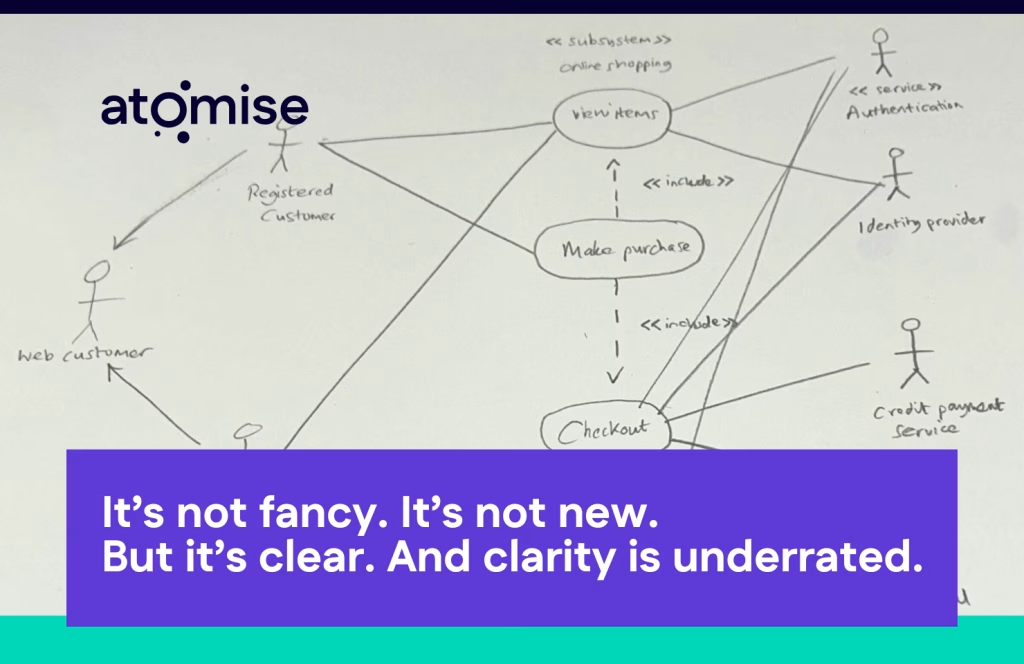
I’ve been using use case diagrams for more than 20 years, and I still have a real soft spot for them.
They’re one of those tools that never stop being useful. I’ve used them on projects big and small, from early-stage MVPs to complex enterprise systems, and they’ve saved me from confusion and rework more times than I can count.
Whenever you need to get everyone — business, design, and engineering — aligned on what a system should actually do, a use case diagram gets you there fast.
It’s not fancy. It’s not new. But it’s clear. And clarity is underrated.
🧠 A quick history lesson
Who invented use case diagrams?
They were created by Ivar Jacobson in the late 1980s at Ericsson to help engineers explain complex telecom systems.
Later, Jacobson teamed up with Grady Booch and James Rumbaugh — The Three Amigos — to form the
Unified Modeling Language (UML).
Of all UML diagrams, use case diagrams remain one of the few still widely used in agile teams today.
They’re not “User cases”
Let’s start with a pet peeve of mine — they’re use cases, not user cases.
A use case diagram shows how different users (or “actors”) interact with a system. It’s about the system’s functionality, not the user’s journey.
A use case, on the other hand, is a written description of one of those interactions — a small story about how a user achieves a goal, step by step.
🗺️ The diagram gives you the map. The written use cases give you the directions.
I love the diagram part because it forces everyone to see the whole system before getting lost in the details. Once you’ve nailed that, you can decide how much depth to go into — and, more importantly, when to switch gears.
🔒 The hidden strength: Security awareness
“The minute you start mapping actors, you’re forced to think about who should actually be able to do what — and that’s where real security conversations begin.”
When you start mapping your actors — “Customer,” “Admin,” “System Service,” “Third-Party API” — you immediately start thinking about permissions and access control.
Who can do what? Who shouldn’t? Where are the sensitive actions?
Those early questions prevent the ‘Wait, should everyone really be able to delete that?’ moments that derail projects later.
What they reveal
Use case diagrams are deceptively simple, but if you do them properly, they tell you a lot about the system you’re building.
A few things I always look for:
- Security and access control: Mapping actors makes you instantly think about permissions and roles.
- Included use cases: These are the foundational bits — the pieces every other interaction depends on. For example, “Submit Application” might include “Validate Data.”
- Extending use cases: These show optional or conditional flows, like “View Report” extending to “Download Report.”
When you look at all of that together, you’re not just diagramming — you’re shaping your roadmap.
You can clearly see what’s essential, what’s optional, and what’s a candidate for later enhancement.
🧩 From diagrams to roadmaps
Pro tip:
“Included” use cases are your backbone.
“Extending” use cases are your opportunities.
Together, they show what to build now — and what can wait.
When you map out these relationships, you’re not just documenting; you’re revealing structure.
It’s a visual way to prioritise.
Included use cases highlight the reusable core of your system.
Extending use cases identify where functionality can grow later without breaking the base.That’s your roadmap right there — clear priorities, clean dependencies, and a natural path to scale.
Flipping the switch to stories
Once the diagram’s done, I like to flip the switch to user stories as quickly as possible.
That’s where the velocity comes in.
User stories turn each use case into something you can prioritise, estimate, and actually build:
- As a [role], I want to [do something] so that [benefit].

You keep the clarity of the diagram but now you’ve got momentum — a backlog the team can move through, learn from, and refine as they go.
That’s the sweet spot: big-picture alignment from the diagram, day-to-day agility from the stories.
💡 Fun Fact
Ivar Jacobson first described use cases in his 1987 paper “Object-Oriented Development in an Industrial Environment.”
That means this technique has been around for almost 40 years — and it’s still solving alignment problems faster than most modern frameworks.
Why I’ll never stop using them
In two decades of projects, I’ve seen a lot of methods come and go. But use case diagrams are still one of the most reliable ways to get a team thinking clearly and working quickly.
They make conversations sharper, priorities clearer, and delivery smoother.
So don’t dismiss them as old-school. Give them a try. They’re quick, visual, and surprisingly powerful once you know how to use them properly.
And if you want to see just how much I love them — and watch me jump around like Doc Brown in Back to the Future talking about actors and included use cases — book a discovery with us at Atomise.
I promise, you’ll never look at a system the same way again.
Bring clarity to complexity.
At Atomise, we use tried-and-tested techniques like use case diagrams to help teams align fast and deliver with confidence.


