
Moving accessibility from checklist to code
As digital ecosystems, teams, and user bases grow, the typical approach to accessibility – a late-stage audit and a mad dash to fix things from a manual checklist -inevitably fails. At a recent NUX Leeds event, Max Lavender, Lead UX Designer at Jet2, presented a compelling talk: “Accessibility by Default: Why Checklists Don’t Scale.”
The session was a deep dive into shifting accessibility from a “reactive” manual task to a “proactive” systemic requirement.
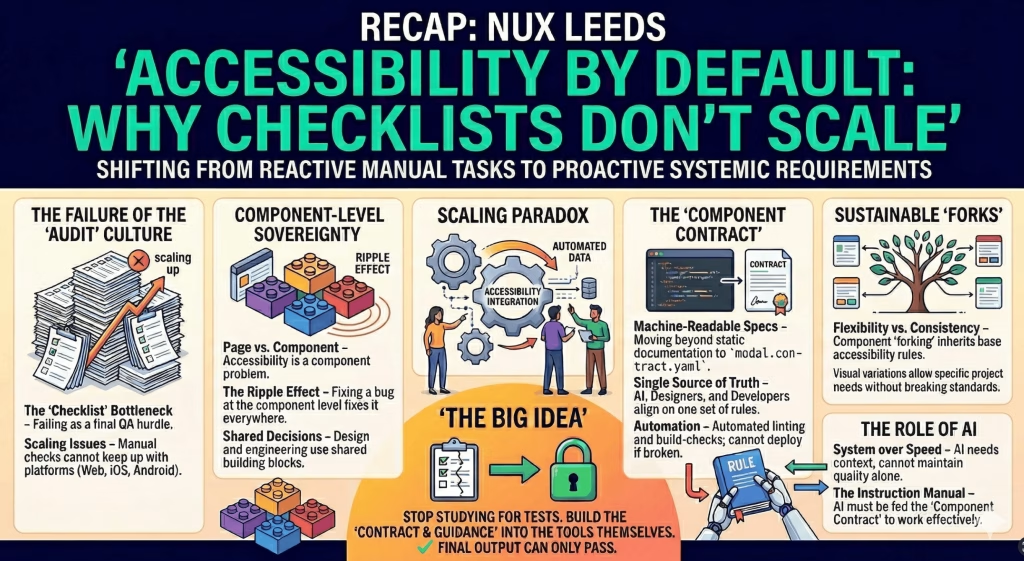
The scaling paradox: Why checklists break down
While the typical WCAG checklist is an admirable goal, treating it as a final test creates a critical bottleneck. As a project scales, the complexity increases exponentially, creating insurmountable challenges:
-
Audit culture is a hurdle, not a foundation: When accessibility is a final QA check, it is treated as an obstruction to deployment, not a core requirement.
-
The problem of volume: The sheer number of screens, edge cases, and distinct platforms (Web vs. iOS vs. Android) quickly overwhelms manual checks.
-
Inefficient replication: Fixing an accessibility bug on a page-by-page basis is a recipe for frustration; you fix it once, and ten copies exist elsewhere.
His central argument was clear: true digital inclusivity requires a radical shift from a reactive, QA-based “audit culture” to a proactive, systemic requirement. We need to encode accessibility directly into the tools, components, and design systems themselves.
Component-level sovereignty
The core of Max’s talk centered on a necessary mindset shift: Accessibility is not a page problem; it is a component problem.
Success lies in component sovereignty. When we solve accessibility problems at the building-block level, the benefits cascade:
-
Shared building blocks: Teams must utilise shared decisions and shared decisions across design and engineering (such as a shared design system or standardised components).
-
The ripple effect: Fixing a behavior – such as defining focus-trapping rules in a Modal component or improving focus states -at the component level automatically applies that fix across the entire product ecosystem.
The component contract: Automating quality
Static, human-readable documentation (which is hard to follow at scale) must evolve into machine-readable “contracts.”
-
Structured and machine-readable: Documentation like a
modal.contract.yamlis more than static text. -
A single source of truth: These structured files act as an instruction manual, aligning designers, developers, and even AI tools on precise specifications.
-
Enforceable quality: These contracts enable automated linting and build-checks. A component cannot be deployed if it breaks the established accessibility contract.
The strategic role of AI
A robust system requires both consistency and flexibility. While consistency is key, different products often need specific variations. The design system should allow for sustainable “forks” that maintain the base accessibility rules but allow for functional or visual tweaks.
Regarding AI, Max highlighted its specific role:
-
System over speed: While AI can generate vast amounts of code quickly, it lacks the contextual understanding to maintain high quality and consistency at scale.
-
Feed the rulebook: AI becomes effective only when it is fed the “Component Contract” as a strict set of rules, rather than being left to hallucinate accessibility requirements.
The Big Idea: Shift Your Mindset
Max’s concluding thought was a powerful call to action: Stop treating accessibility like a test you study for at the end of a project.
True success means building the contract and guidance into the tools themselves. By doing so, we effectively eliminate the possibility of failure: the final output can only pass.
Final takeaway
Accessibility doesn’t scale through checklists. It scales through systems.


